Avaturn GDevelop Extension
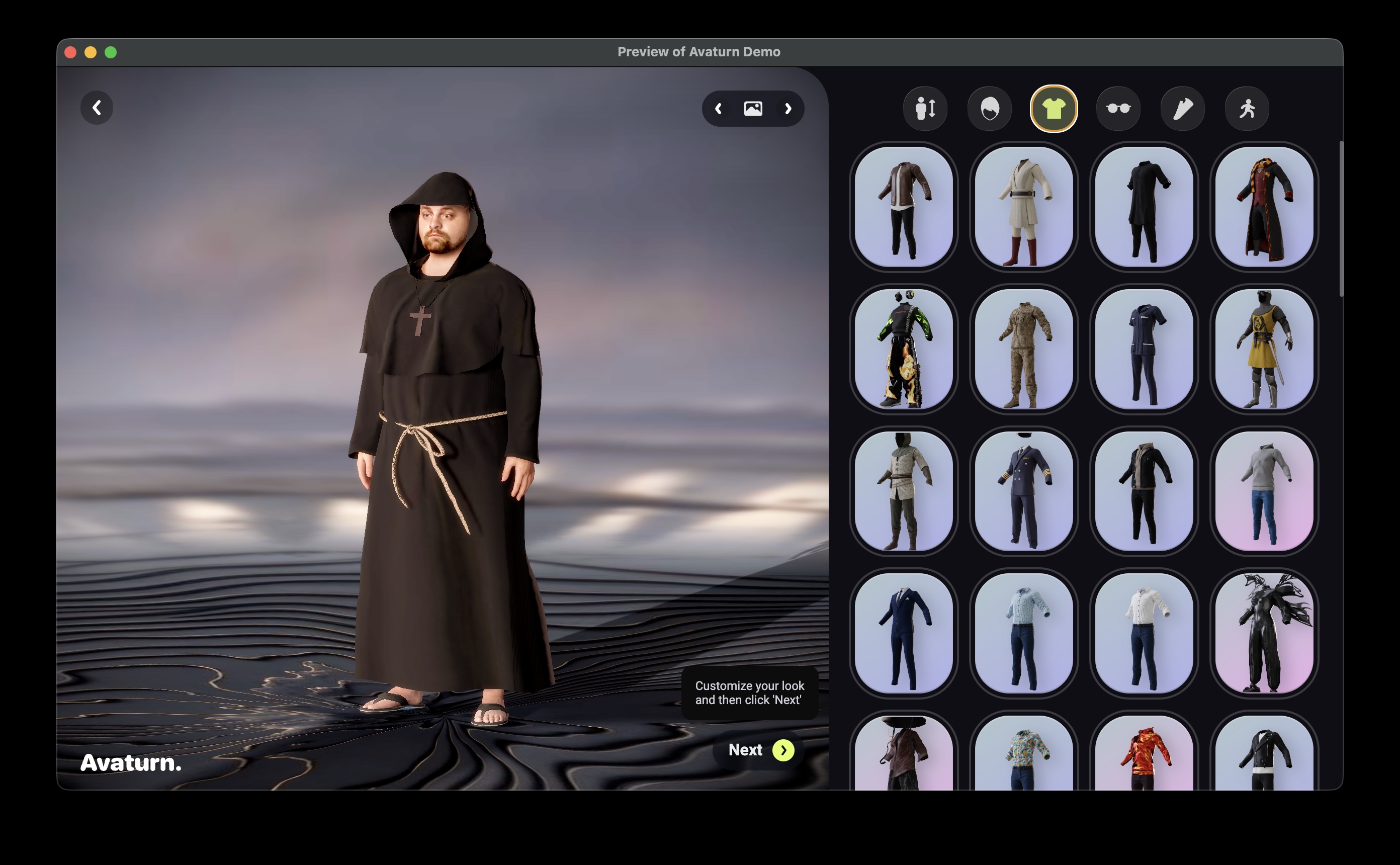
One click opens a full 3D character creator inside your game. Your player uploads a selfie, customizes their avatar, hits Next, and seconds later they're walking, running, and fighting on screen as their own custom character. Fully animated. Zero UI built by you.
The 15-second pitch
Attach one behavior to a 3D model object. Call one action to open the Avaturn character creator fullscreen, right over your game. When your player finishes, the extension grabs the exported avatar and drops it straight into your scene, already wearing your character's animations. That's it. No custom character-builder UI, no manual model swapping, no rig wrangling.
Why it's special
- In-game 3D character creator, zero UI to build. The official Avaturn editor opens as a fullscreen overlay on top of your game. You don't design a single customization screen.
- Selfie in, playable character out. Players upload a photo, dress their avatar, and see it walking around your game moments later. That's the kind of "wow" that gets your game shared.
- Instant animation on "inanimate" exports. Avaturn avatars export with no animations at all. This extension rebinds your character's existing animation clips onto the new avatar by bone name, so the freshly customized model can immediately walk, run, dance, or swing a sword.
- Animations stay put. When you load a new avatar, whether from the live editor or a bundled resource, your object's existing animation library is preserved and re-bound onto it automatically. Whatever animation is currently playing keeps running right through the swap. Nothing to re-wire, nothing to reload.
- Share animations between characters. One action copies animation clips from an animated model onto another, even a completely inanimate one. Call it as many times as you like from different sources: clips merge and dedupe by name, each keeps its own loop or play-once setting, and playback is never interrupted.
- Quaternius animations included. The demo ships with a solid set of free Quaternius animation library (1 and 2) ready to use out of the box: idle, walk, jog, sprint, jump, combat, and more (85 animations in total). Want a bigger motion library? Quaternius Pro is available for purchase separately.
- Two ways to load an avatar. Live from the editor or from a bundled model as a project resource with zero network calls.
How easy it is
+ Mouse released on CustomizeButton   -> Avaturn::OpenEditor(TargetModel, "demo")
+ Avaturn::Avaturn::WasExported(TargetModel)   -> Avaturn::LoadAvatar(TargetModel, TargetModel.Avaturn::getAvatarUrl())
+ Avaturn::wasJustLoaded(TargetModel)   -> (your avatar is now visible: show your UI, unpause the game, whatever you need)
Three events. That's the entire flow from "click a button" to "your player's custom avatar is standing in your game, animated and ready to play."
What's in the box
Behavior: Avaturn Avatar (attach to any Scene3D 3D model object)
Properties:
- Avatar URL: a GLB to auto-load when the object is created. Perfect for restoring a saved avatar.
- Editor subdomain: your Avaturn studio subdomain, or leave it on the public demo editor.
Actions:
- OpenEditor: opens the fullscreen Avaturn character creator.
- CloseEditor: closes the editor overlay without waiting for the player to finish.
- SetSubdomain: sets the subdomain used the next time the editor opens.
- LoadAvatar: loads an avatar GLB from a URL into the object, keeping its animations.
- LoadFromResource: loads a downloaded avatar GLB from your project's resources, no network required.
- CopyAnimationsTo: copies animation clips from this model onto another model.
Conditions:
- IsEditorOpen: true while the editor overlay is open.
- WasExported: true once, right after the player finishes customizing and exports.
- wasJustLoaded: true once, right after an avatar finishes loading.
Expressions:
- getAvatarUrl, getAvatarId, getGender, getBodyId, getSubdomain.
Animations:
- An animated model with Quaternius animation library 1 and 2 animations included, ready to use out of the box (85 animations in total).
Bring your own animations (paid add-on)
Want animations beyond what ships with the extension? Grab the retarget.zip add-on, a Blender-powered command line tool that retargets any animation library onto your character rig and exports a ready-to-use GLB.
- Auto-detects common source rigs: Mixamo, Unreal Engine Mannequin, and Blender Rigify. No manual bone mapping needed.
- Retarget an entire animation library or just the clips you name. Each one comes out as its own named animation, ready to play.
- One command does the whole job:
blender -b --factory-startup -P cli_retarget.py -- source.glb target.glb export.glb. Works on macOS and Windows. Needs Blender, nothing else to install. - GLB in, GLB out. The result drops straight into GDevelop and works perfectly with this extension's animation loading and copying actions.
The pipeline: find or buy an animation library you love, retarget it onto your Avaturn character with the add-on, then load and play it in GDevelop. No rigging skills required.
Try the demo
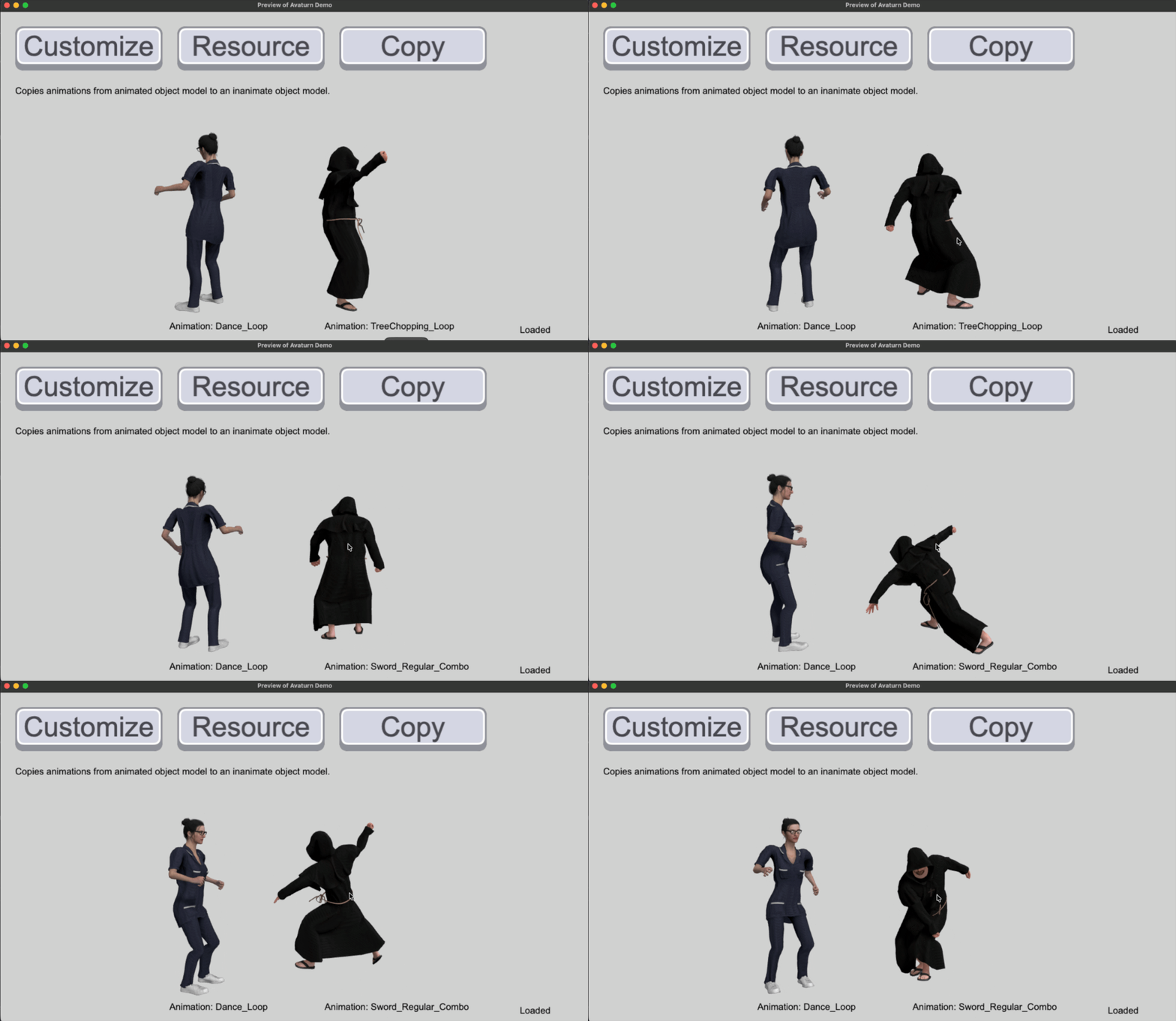
The included demo scene puts two fully rigged 3D characters side by side, spinning slowly under real lighting with cast shadows. Click either one to cycle through its animations live. Three buttons show off every way to bring an avatar into your game:
- Customize: opens the live editor and loads your finished avatar straight into the scene, animations intact.
- Resource: loads an inanimate avatar bundled with the project onto an already-animated model, no network needed.
- Copy: copies the full animation set from one model onto another, previously inanimate model.
Good to know
- The live editor and loading a fresh avatar both need an internet connection. Loading from a bundled resource does not.
- The public demo editor works out of the box. For a branded experience, point the extension at your own Avaturn developer portal subdomain.
- Players will need to sign up to Avaturn with an email address and a selfie to build their avatar. That happens inside the editor overlay, not in your game's code.
- This extension handles avatars and animations only. It does not include ragdoll or physics behavior.
- You can use Avaturn characters with these animations in your game even if you don't use the Avaturn editor. Just load a GLB from your resources or copy animations from another model.
Get started
- Download the extension below.
- Import it into your GDevelop project.
- Attach the Avaturn Avatar behavior to a 3D model object.
- Wire up the three events above.
- Ship a game where every player can look like themselves.
It's free. Go grab it and give your players a character creator worth showing off. If you need more animations than what's included, check out the retarget.zip add-on to bring in your own.
Credits
Built on the official Avaturn character creator and SDK. Animations courtesy of Quaternius.
Download
Click download now to get access to the following files:
Leave a comment
Log in with itch.io to leave a comment.