Proximity Voice GDevelop Extension
Add proximity-based voice chat to your multiplayer GDevelop games. Hear players only when they're nearby. Walk away and voices fade out. Get closer and they get louder.
Perfect for party games, MMOs, hide-and-seek, roleplay servers, and any multiplayer game where "who's in earshot" matters.
📦 What's Included
✅ FREE — Extension, Signalling Server & Public Testing Server
- Proximity Voice Extension — GDevelop 5 events-based extension with actions, conditions, expressions, and three behavior types (2D Sprite, 3D Box, 3D Model).
- Signalling Server — Lightweight Node.js WebSocket server for peer discovery (SDP/ICE exchange). Run locally for testing or on your server for production.
- Public Testing Signalling Server — Free shared signalling server for quick testing:
wss://freews.avramovic.info. Shared across all free users — you must set a unique Game ID with Set Proximity Voice Game ID (writes__ProximityVoice.GameId) to keep your game's rooms separate from other developers. Generate a UUIDv4 at https://www.uuidgenerator.net/. - Full source code — Modify and customize as needed.
💎 $5 Demo Project + Credentials Dashboard + Private Signalling Server (optional)
Get a complete, ready-to-run GDevelop demo project plus access to our credentials dashboard.
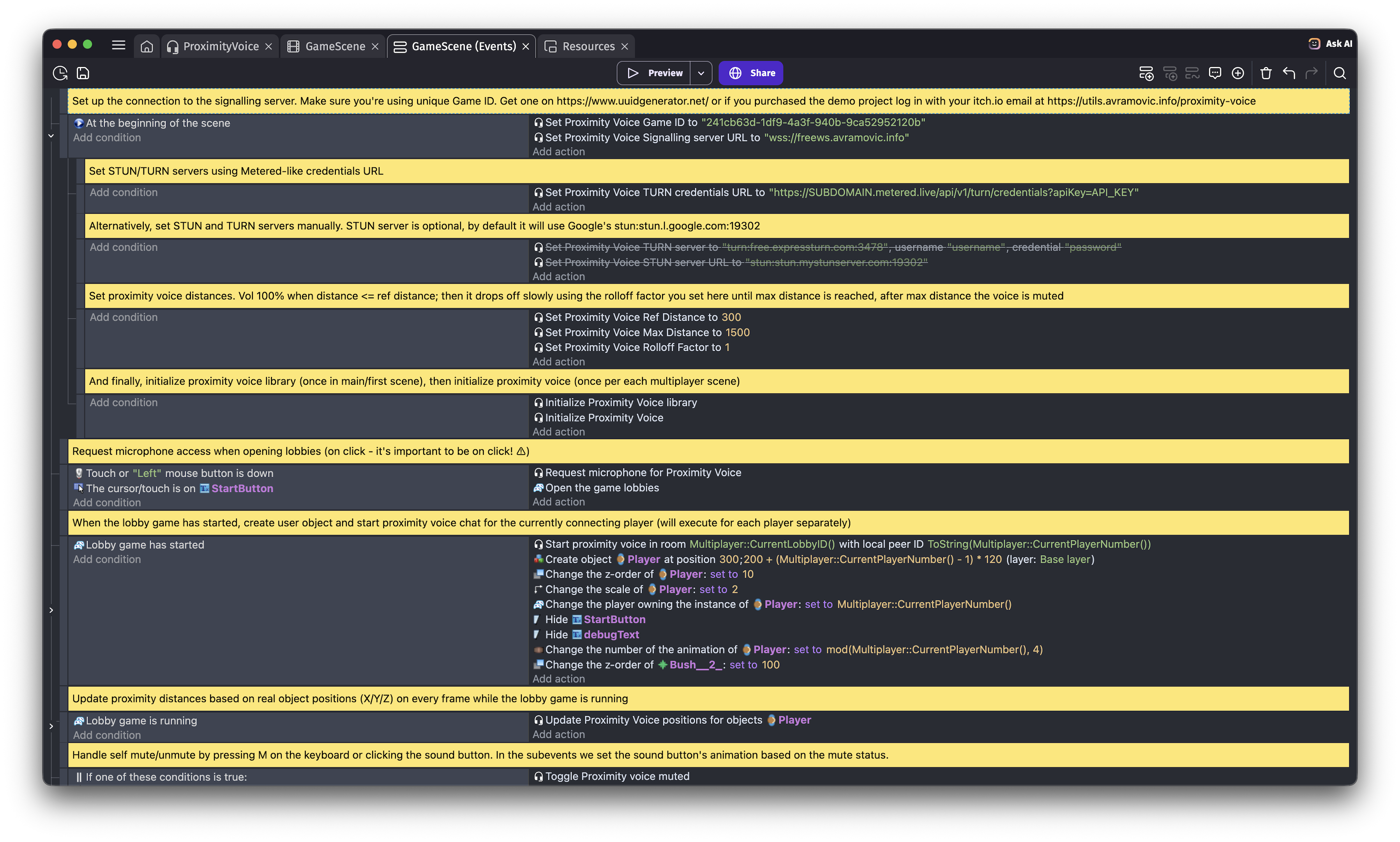
- Ready-to-run demo project — Practical scene/event setup you can adapt quickly instead of building voice integration from scratch.
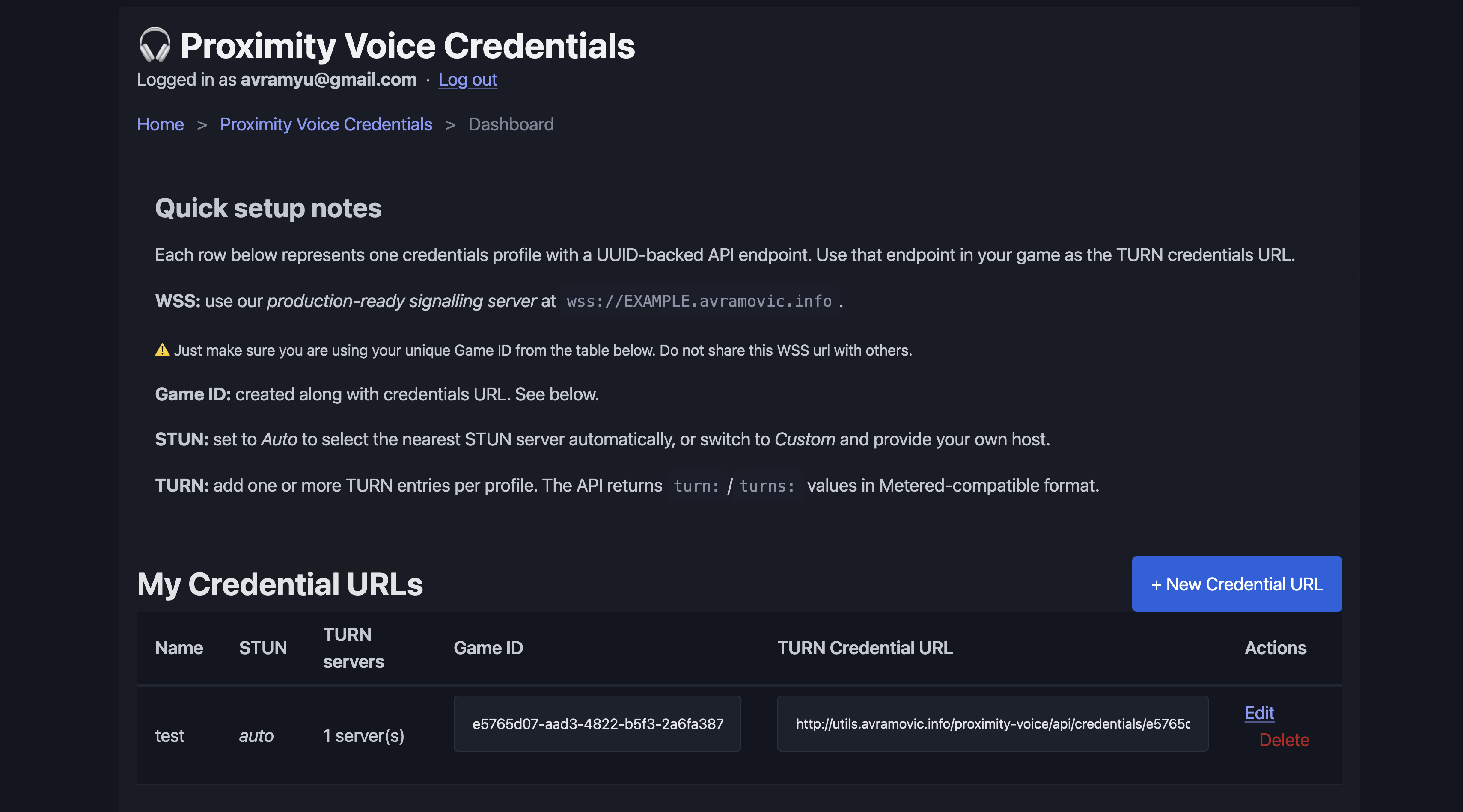
- Credentials dashboard — Dynamically provide and rotate TURN/STUN servers without shipping a new game build.
- Centralized infrastructure control — Update connection credentials on the fly and scale relay infrastructure as your player count grows.
- Private Signalling Server — Private premium signalling server for paying customers (isolated from free users and the free public server, and more reliable for production use).
🚀 How It Works
Proximity Voice uses:
- WebRTC — Peer-to-peer audio with ultra-low latency. No game server needed for voice (only your lightweight signalling server for handshake).
- Sender-side volume control — Each client adjusts its outgoing audio per peer based on distance, using Web Audio GainNodes on the local microphone stream. Works around Chrome's limitation where Web Audio on remote WebRTC streams produces silence.
- Your own signalling server — Small, efficient Node.js server that only exchanges connection setup metadata; voice streams go directly peer-to-peer.
- TURN servers (when needed) — Used as a relay fallback only when direct peer-to-peer connection cannot be established (for example, strict NAT/firewall networks). Relay traffic can increase bandwidth usage and TURN hosting costs.
Result: One object = one "ear" (listener). Other objects = other players' voices. Update positions every frame and the extension handles everything else.
✨ Features
- Distance-based volume — Configurable ref distance, max distance, and rolloff factor (same units as your game, e.g. pixels).
- Per-player mute — Local mute, mute specific players, or mute all remotes.
- "Flat" mode — Toggle proximity off to hear everyone at full volume (useful for card or board games).
- Global volume control — Master volume slider for all remote voices (in-game settings).
- Flexible STUN/TURN — Default Google STUN included; TURN via credentials URL (e.g., Metered) or manual TURN servers (ExpressTurn, self-hosted coturn).
- Three behaviors for different game types:
- Proximity Voice 2D (Sprite-based games)
- Proximity Voice 3D Box (3D grid-based games)
- Proximity Voice 3D Model (Full 3D games)
- Host migration support — Seamless room renaming when multiplayer host changes.
📋 Quick Start
1. Set up the signalling server
cd signalling-server && npm install && npm start
For local testing, use: ws://localhost:8765
For quick public testing (no server setup), use: wss://freews.avramovic.info
⚠️ Set a unique Game ID with Set Proximity Voice Game ID (writes __ProximityVoice.GameId) — the public server is shared by all free users. Without a unique Game ID, your rooms may collide with other developers' games. You can generate one at https://www.uuidgenerator.net/.
See signalling-server.zip/README.md for production setup.
2. Add the extension to your GDevelop project
- Open GDevelop and load your project.
- In Project Manager, add the extension from
proximityvoice.json.
3. Set up in your game
First scene:
- Call action: Initialize Proximity Voice library
Game scene (or any multiplayer scene):
- Call action: Initialize Proximity Voice
- Set Signalling server URL (extension options or scene variable
__ProximityVoice.SignallingUrl)- Example:
ws://localhost:8765(local testing) orwss://your-server.com:8765(production)
- Example:
- If you use the free public testing server, call Set Proximity Voice Game ID with a unique UUIDv4 (this sets
__ProximityVoice.GameId)- Generate one at https://www.uuidgenerator.net/
- Optionally set TURN credentials URL (e.g., Metered) or Set TURN server manually (ExpressTurn, coturn)
- Request microphone permission on user click (e.g., "Join game" button)
Add the behavior:
- Add Proximity Voice 2D/3D Box/3D Model behavior to your game objects
- Set one object as the listener (local player's ear): Is listener = Yes
- Set others as speakers: Peer ID = their peer identifier (from your multiplayer logic)
Every frame:
- Call action: Update Proximity Voice positions for all objects with the behavior
- For mixed 2D+3D scenes: call once per behavior type (e.g., once for Sprites, once for 3D Boxes)
4. Start the voice chat
When players join a multiplayer room:
- Call action: Start proximity voice with room ID and local peer ID
🎮 Extension Actions, Conditions & Expressions
| Category | Examples |
|---|---|
| Actions | Initialize library, Initialize Proximity Voice, Set Signalling/STUN/TURN URLs, Request microphone, Start/Stop proximity voice, Mute/Unmute, Mute remote players, Toggle proximity mode, Set global volume, Set distance curve (Ref/Max/Rolloff), Update positions, Host migration, Set Game ID, Set debug |
| Conditions | Is connected, Is muted, Remote player is muted, All remotes muted, Proximity enabled |
| Expressions | Local peer ID, Global volume |
| Behaviors | Proximity Voice 2D/3D Box/3D Model — each with Is listener, Peer ID |
⚙️ Configuration (Scene Variables)
Use the __ProximityVoice structure to configure:
| Setting | Purpose |
|---|---|
| SignallingUrl | WebSocket URL of signalling server (required) |
| TurnCredentialsUrl | Optional URL returning TURN/STUN config (e.g., Metered API) |
| TurnServer, TurnUsername, TurnCredential | Manual TURN (set via action) — turn: or turns: URL + credentials
|
| StunServerUrl | Override STUN server (default: Google's stun:stun.l.google.com:19302)
|
| RefDistance, MaxDistance, RolloffFactor | Proximity curve (same units as game positions) |
| UseProximity | Toggle proximity on/off globally |
| GlobalVolume | Master volume (0–2) |
| GameId | Identifies your game on the signalling server. Set via Set Proximity Voice Game ID action (__ProximityVoice.GameId). Required on the free public testing server to avoid room collisions with other developers
|
🌍 Requirements
- GDevelop 5.6+
- Browser with WebRTC & Web Audio (Chrome, Firefox, Edge, Safari; mobile may require HTTPS)
- HTTPS or localhost — Browsers require it for microphone access in production
- Signalling server running — Use the included Node.js server or run your own
🔧 Advanced: Host Migration
For GDevelop multiplayer with host migration: when the host leaves, the new host gets a new lobby ID. To keep all players in the same voice room, call:
Condition: "Host is migrating" and "Player is host"
Action: Migrate proximity voice room to new lobby id
When host migration completes and this client is the new host, call it with the new lobby ID. The server renames the room; all peers stay synchronized.
🖥️ Electron / Desktop Export
This extension is primarily built for web builds of your games, but if you like to experiment, it could be possible to make it work in Electron/Desktop export by following the steps below.
- Open your Electron main process file (for example
main.js,electron.js, or the file that createsBrowserWindow). - Add a permission request handler so microphone access is allowed when requested:
const { session } = require('electron');
session.defaultSession.setPermissionRequestHandler((webContents, permission, callback) => {
  if (permission === 'media') {
    callback(true);
  } else {
    callback(false);
  }
});
- On macOS, ensure your app has Microphone usage/entitlement configured so the OS can show the permission prompt.
- Rebuild or re-export the Electron app, run it again, and grant microphone permission when prompted.
📥 What You Get
- Proximity Voice Extension — Free GDevelop 5 extension (open-source)
- Signalling Server — Free Node.js WebSocket server for peer discovery
- Public Testing Signalling Server — Free shared server at
wss://freews.avramovic.info(set a unique Game ID using Set Proximity Voice Game ID) - $5 Demo Project + Credentials Dashboard + Private Signalling Server — Complete ready-to-run project + dynamic TURN/STUN management + private premium signalling server isolated from free users
💡 Perfect For
- 🎉 Party games — Local voice for mini-games
- 🗡️ MMOs & RPGs — Area chat, proximity-based communication
- 🔍 Hide-and-seek — Find others by voice proximity
- 🎭 Roleplay servers — Natural zone-based communication
- 🤝 Any multiplayer game where "who's nearby" matters
📜 License & Credits
Use the extension and signalling server freely. Voice is peer-to-peer (WebRTC) where available (TURN servers used where not); the signalling server only relays connection metadata, not audio.
Download
Click download now to get access to the following files: